
Cut and fill volume calculator
Compare the existing ground against a level, a pad or a design surface and get cut, fill and the material to haul away or bring in, with a report ready to deliver.
Developed by 
What it includes
Four calculation methods
Surface against surface, profiles (average end area), pad with slopes and stockpile.
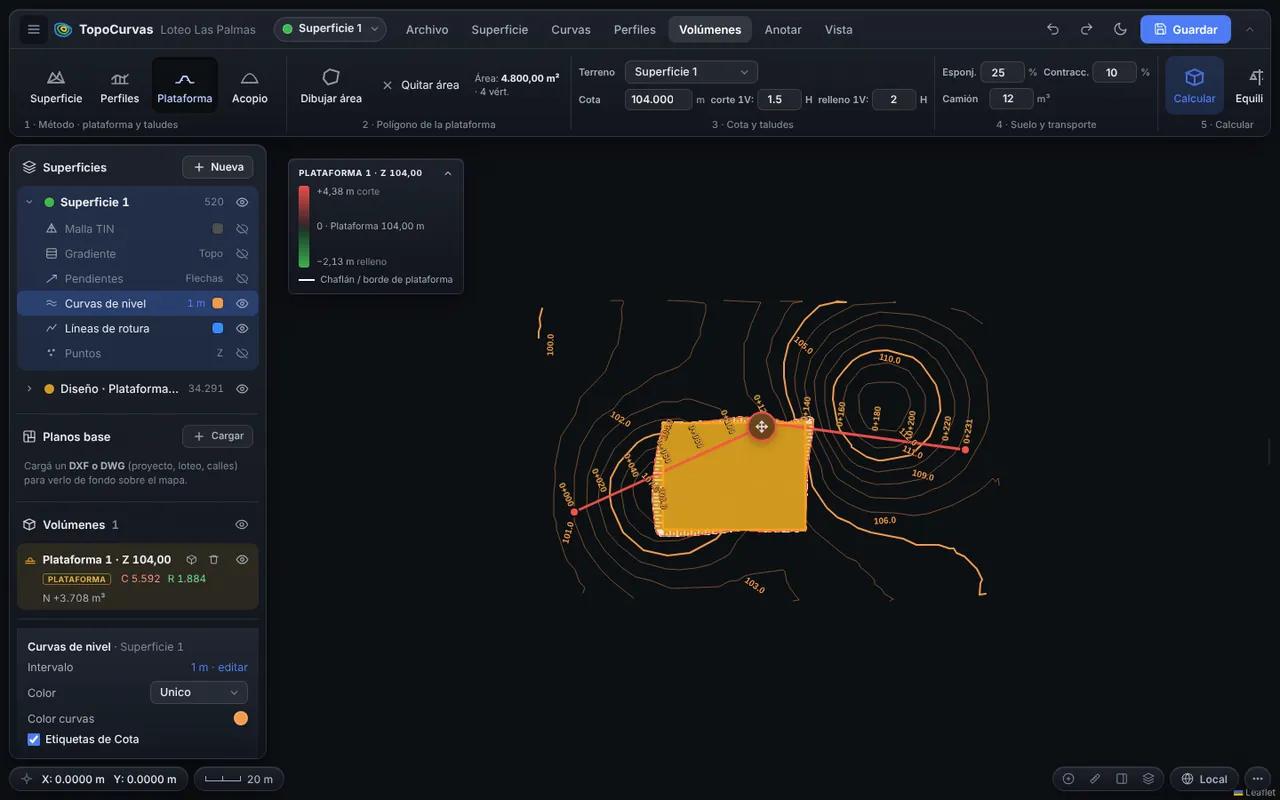
Pad with slopes
Set the level and the cut and fill slopes: the toe line, depth contours and zero line are drawn for you.
Soil and hauling
Swell, shrinkage and truck capacity: material to remove or import and the number of trips.
Mass curve and tables
Areas, partial and cumulative volumes per chainage.
PDF report
One chapter per calculation, with plan, sections, 3D view and table. Download it directly, also on iPhone and iPad.
How it works
- Choose the calculation method.
- Draw the polygon or define the alignment and levels.
- Calculate and review cut, fill and balance.
- Download the PDF report or build the sheets.
FAQ
Which calculation method is used?
For profiles, the average end area method: the mean of two consecutive section areas times the distance between them. For surfaces and pads, it integrates each fragment of the TIN mesh.
Do the results replace a professional check?
No. They are a support calculation: verification and sign-off belong to the professional in charge of the work.
You may also like
Longitudinal profile and cross sections
Draw the alignment on the map and the ground is interpolated from the TIN mesh. The profile and sections update as you move the alignment.
Learn more →Contour line generator from survey points
Upload the points file from your survey and get contour lines in seconds, on a TIN mesh you can fix by hand so the terrain looks the way it really is.
Learn more →Export your survey to DXF and ready-to-deliver sheets
Before exporting you see a preview of how it will look in CAD, with the chosen sheet and plot scale, so text stays readable and does not overlap.
Learn more →Try it with your own points
It runs in your browser: no account, nothing to install.
Open the free app